

Download Tune – Control Toxicity, Boost Online Harmony
Overview: A Smarter Way to Filter Online Negativity
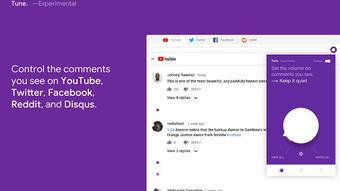
In today’s hyper‑connected world, comment sections on platforms like Facebook, Twitter, Reddit, and Disqus have become both a source of lively discussion and a breeding ground for unfiltered hostility. Tune steps in as a browser extension that empowers users to decide how much toxicity they want to encounter while browsing. Think of it as a volume knob for negativity: you can dial the “toxicity meter” down to a serene, Zen‑mode that blocks harsh language, or you can raise it to see every opinion—good or bad—if you prefer full transparency. The extension works across the most popular browsers and integrates directly with the comment streams of major social media sites, giving you granular control over profanity, personal attacks, and insults.
Because the internet is a living ecosystem, Tune offers a flexible, experimental approach. Users can set a custom threshold that balances free expression with personal well‑being. While the algorithm is still learning and may occasionally miss a hurtful remark or mistakenly hide a harmless comment, the overall experience is a significant step toward a healthier online environment. The tool is free to download, regularly updated, and designed with privacy in mind—no personal data is harvested or sold.
For anyone who spends hours scrolling through feeds, engaging in community discussions, or simply enjoys a calmer browsing experience, Tune provides a practical, user‑friendly solution. By reducing exposure to toxic content, you can focus on the information that truly matters, stay more productive, and protect your mental health without sacrificing the richness of online conversation.
Key Features & How Tune Works
- Adjustable Toxicity Slider: Set the level of profanity, personal attacks, and insults you want to see—from “Zen Mode” (completely filtered) to “Full Volume” (no filtering).
- Multi‑Platform Support: Works seamlessly with Facebook, Twitter, Reddit, Disqus, and any site that uses standard comment widgets.
- Customizable Filters: Choose specific categories (e.g., profanity, hate speech, harassment) and adjust each independently.
- Real‑Time Updating: The extension processes new comments as they load, ensuring that the filter stays current during scrolling.
- Privacy‑First Design: All processing happens locally in your browser; no comment data is sent to external servers.
- Free & Open‑Source Core: Download without cost, with optional donations to support continued development.
Behind the scenes, Tune leverages a lightweight natural‑language processing (NLP) model that evaluates each incoming comment against a pre‑trained toxicity lexicon. When a comment exceeds the user‑defined threshold, the extension either blurs it, replaces it with a neutral placeholder, or hides it entirely, depending on the chosen mode. Users can also whitelist specific words or phrases, allowing for nuanced control—perfect for communities that use reclaimed language or insider jokes.
The user interface is deliberately minimalistic. After installing the extension, a small icon appears in the browser toolbar. Clicking the icon opens a pop‑up where you can drag the slider, toggle individual filter categories, or reset to default settings. A “preview” button lets you see how the current configuration would affect a sample comment thread, giving you confidence before applying changes site‑wide.
Because Tune is still in the experimental stage, the development team encourages feedback directly through the extension’s “Report Issue” button. This community‑driven approach helps refine the detection algorithms, reduces false positives, and improves overall accuracy over time.
Installation, Usage Instructions & Compatibility
Step‑by‑Step Installation
- Visit the official Tune download page (or the Chrome Web Store / Firefox Add‑ons site).
- Click “Add to Chrome” or “Add to Firefox” and confirm the permission prompt.
- Once installed, a small purple “T” icon appears in your browser toolbar.
- Click the icon to open the configuration panel and set your preferred toxicity level.
- Refresh any open social‑media tabs to let Tune apply its filters immediately.
How to Use Tune Effectively
After installation, you’ll notice the extension’s icon changing color based on the active mode—green for Zen, orange for moderate, and red for full exposure. To adjust the filter, simply drag the slider left or right. For more granular control, expand the “Advanced Settings” section where you can enable or disable specific categories such as profanity, harassment, or slurs. If you encounter a comment that was incorrectly filtered, click the “Report” button within the placeholder to help improve the algorithm.
For power users, Tune offers a “Keyboard Shortcut” (default: Ctrl+Shift+T on Windows/Linux, Cmd+Shift+T on macOS) that toggles between Zen and Full modes instantly, allowing you to adapt quickly while reading fast‑moving threads.
Supported Operating Systems & Browsers
Tune is compatible with all major desktop operating systems:
- Windows 10 and later (Chrome, Edge, Firefox)
- macOS 11 (Big Sur) and later (Chrome, Safari, Firefox)
- Linux distributions with Chromium‑based browsers or Firefox
Mobile support is currently limited to Android Chrome via the “Chrome Extensions” experimental feature; an iOS version is planned for future releases. Because the extension runs locally, there’s no need for additional software, and updates are delivered automatically through the browser’s extension store.
Overall, Tune offers a frictionless setup experience, with clear visual cues and intuitive controls that let both novice and advanced users fine‑tune their online environment in seconds.
Pros, Cons & Frequently Asked Questions
Pros
- Highly customizable toxicity control gives users real power over their browsing experience.
- Works across the most popular social platforms without requiring separate installations.
- Local processing ensures privacy and fast performance.
- Free to download, with regular updates that improve accuracy.
- Simple UI and keyboard shortcuts make real‑time adjustments effortless.
Cons
- Being experimental, the algorithm may occasionally miss harmful comments or hide neutral ones.
- Mobile support is limited; full functionality is best on desktop browsers.
- Customization options, while extensive, may overwhelm first‑time users.
- Does not filter images or videos—only textual comments.
FAQ – Your Questions Answered
Is Tune completely free?
Yes, Tune can be downloaded and used at no cost. The developers accept optional donations to fund ongoing improvements, but no premium tier is required for full functionality.
Does Tune collect my browsing data?
No. All comment analysis is performed locally in your browser. Tune does not send any personal data or comment content to external servers, preserving your privacy.
Can I whitelist certain words or phrases?
Absolutely. In the Advanced Settings panel, you can add custom words to a whitelist, ensuring they are never filtered regardless of the overall toxicity level.
Will Tune work on private or incognito windows?
Yes, but you need to enable the extension for incognito mode in your browser’s extension settings. Once enabled, Tune functions exactly as it does in regular windows.
How often are updates released?
The development team pushes updates roughly once a month, addressing bug fixes, improving the toxicity detection model, and adding minor feature enhancements.
Conclusion & Call to Action
In a digital landscape where negativity can spread faster than any meme, Tune offers a practical antidote. By giving users direct control over the amount of toxic content they encounter, the extension promotes a healthier, more enjoyable browsing experience without sacrificing the authenticity of conversation. While it’s still in an experimental phase, the rapid update cadence and community‑driven feedback loop suggest a bright future for the tool.
If you value mental well‑being, productivity, or simply want a calmer scroll through your favorite feeds, downloading Tune is a small step that can make a big difference. Click the download button below, set your preferred toxicity level, and start enjoying a more balanced online environment today.